Glowing Bubbles: A Modern Display Font for Playful Web Design
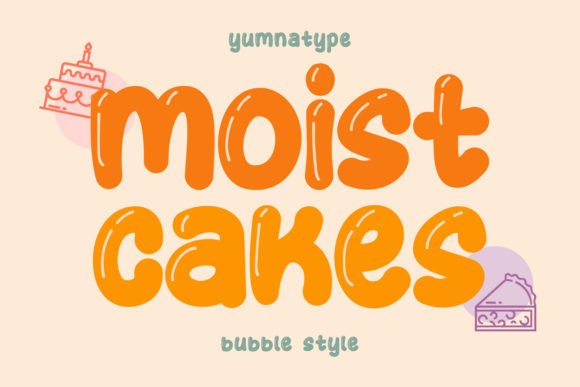
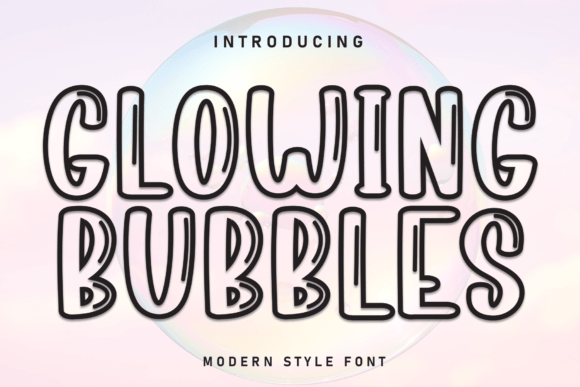
I remember the moment clearly: I was building a landing page for a children's party planner client, and the hero heading felt flat. The client wanted something cheerful, round, and full of personality — not another generic sans serif. That’s when I pulled up Glowing Bubbles, a modern display font that features bright, bubble-like letters. At first glance, I knew this display font could be the hook the design needed. After testing it across several web mockups, social media templates, and digital branding assets, I want to share a hands-on review from a web designer’s perspective. If you create digital products, sell printables, or design for playful brands, this font deserves a close look.
Glowing Bubbles for Social Media Graphics and Digital Branding
When I design social media templates for clients in the party and lifestyle space, I need fonts that read well at small sizes but still deliver a punch of personality. Glowing Bubbles excels in this setting. I tested it on Instagram story titles, Pinterest pins, and Facebook event covers, and the bubble-like letterforms stayed clear and cheerful even when scaled down. The rounded strokes give the text a soft, approachable feel that works beautifully for birthday announcements, product launches, or boutique brand headers. For a recent set of spring sale graphics, I used Glowing Bubbles for the main headline and paired it with a quiet sans serif for the body. The contrast was immediate: the display font grabbed attention, while the supporting text kept the layout readable. If you sell digital templates or design social media assets for clients, this display font adds a layer of handmade charm that algorithms can’t replicate — but customers can feel.
How Glowing Bubbles Performs in Web Headlines and Hero Sections
Hero headings on websites carry a lot of weight. They need to communicate tone, capture interest, and fit the brand’s visual language. I tested Glowing Bubbles in a few hero section mockups for a fictional craft kit subscription and a real client’s children’s book author site. The font performed best when used for short, punchy phrases — think “Make Magic” or “Play All Day.” The bubble-like letters feel dimensional without being distracting, which is a rare balance. In larger sizes above 72 pixels, the curves become even more pronounced, giving the heading a hand-drawn, almost tactile quality. That said, this is not a font for long navigation menus or body copy. As a web designer, I recommend reserving Glowing Bubbles for primary headlines, call-to-action buttons, or decorative subheadings where you want a moment of visual delight. For product pages or landing sections aiming for a whimsical or nostalgic mood, this display font becomes a natural conversation starter.
Pairing Glowing Bubbles with Clean Sans Serif Fonts for Web Layouts
Every web designer knows that a standout display font needs a reliable partner. In my testing, Glowing Bubbles paired beautifully with lightweight sans serif fonts like Inter, Lato, or Montserrat. The rounded, playful nature of the bubble letters finds balance against clean, neutral body type. For a mockup email newsletter and a product listing page, I set the headline in Glowing Bubbles and the supporting text in a simple sans serif at 16 pixels. The result felt cohesive without being noisy. I also experimented with a handwritten script font as a secondary accent, but the pairing quickly became too busy. Stick to one decorative element per layout. When you let Glowing Bubbles lead, the display font does the heavy lifting emotionally, while a minimal sans serif keeps the design grounded. For boutiques, party planners, printable shops, or creative service pages, this combination builds a brand identity that feels both crafted and professional.
Readability Considerations for Glowing Bubbles in Digital Design
Readability is the first question I ask when testing any display font for web use. With Glowing Bubbles, the bubble-like structure is inherently legible at medium to large sizes, but there are limits. On a recent test for a mobile hero section, I set the heading at 36 pixels and the word “celebrate” read clearly. However, when I dropped the size to 24 pixels for a subheading, the rounded details began to soften, and the word lost some distinction. For web designers, this means Glowing Bubbles works best above 30 pixels for digital screens. I also recommend avoiding all-caps settings for longer phrases — the bubble shapes can feel cramped. Title case or sentence case preserves the open, airy quality of the font. If you’re designing for Cricut or Silhouette cut files, printable wall art, or sticker sheets, the same principle applies: keep the text size generous to let the bubble shapes shine. For product labels, tags, or small packaging, test a physical print before committing — this display font favors bold statements over fine details.
Commercial Licensing and File Formats for Web Designers
Before I invest time in a font for client projects, I always verify the licensing terms. Glowing Bubbles, like many modern display fonts, is often available with a commercial license that covers web use, digital templates, and physical merchandise. For web designers, this means you can use it in website mockups, social media graphics, email headers, and client branding packages as long as the license permits. I also check whether the font includes web font formats like WOFF and WOFF2, which are essential for embedding in live sites. Some versions of Glowing Bubbles may include alternate characters, ligatures, or multilingual support — these extras matter when designing for diverse audiences. Before selling printables, digital downloads, or SVG-style designs that incorporate the font, confirm that your license covers commercial redistribution. A few extra minutes reviewing the license agreement protects your shop and your clients. For a web designer building brand identities, having a reliable, well-licensed display font like Glowing Bubbles in your toolkit means you can offer clients a unique visual voice without legal worries.
Where Glowing Bubbles Fits in a Web Designer’s Font Library
After testing Glowing Bubbles across web mockups, social templates, product packaging concepts, and printable designs, I can confidently say this font earns a spot in any designer’s collection focused on playful, warm, or nostalgic aesthetics. It is not a workhorse for long body text or dense information, but that is not its purpose. As a display font, Glowing Bubbles brings a genuine sense of joy and approachability to any project. I have used it for kids birthday invitations, boutique brand hero sections, printable party signage, and even a whimsical thank-you card series. Each time, the bubble-like letters created an emotional connection that plain typography could not. For web designers who serve creative entrepreneurs, handmade sellers, or family-oriented brands, this font offers a fast path to a distinctive visual personality. Keep it for headlines, logos, and accent phrases — and let it be the bright moment in your next layout.
Whether you are designing a landing page, crafting a social media campaign, or building a full brand kit, Glowing Bubbles delivers the kind of expressive, human-centered typography that stands out in a crowded digital space. Add it to your font library, test it on a real project, and watch how a single display font can transform the tone of your work.